
The Spinbara casino login process is a single-step form — email address, password, submit. On a stable connection it takes under ten seconds. That simplicity is by design: the platform uses a browser-based setup with no app download required, so the login flow works identically on desktop, iPhone, Android and tablet without version differences or platform-specific quirks.
This page covers the standard login process, mobile access, the password reset procedure, PlayID quick login, common access problems Australian players encounter and how to resolve each one. If you are trying to get into your account right now, the step-by-step section below gets you there in under a minute.
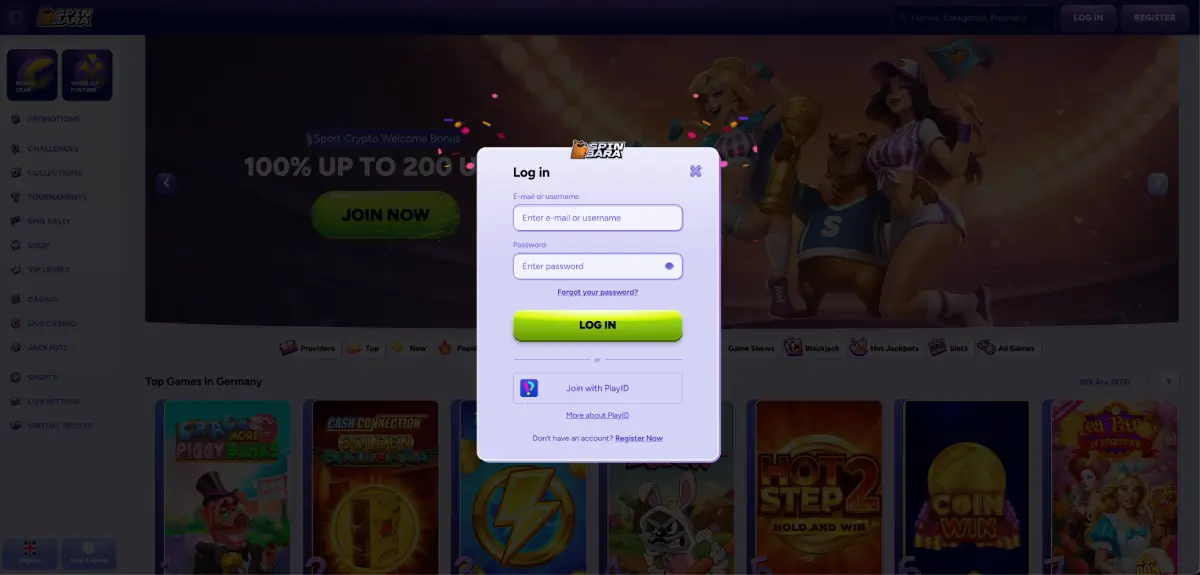
How to log in to Spinbara casino
The login button sits in the top-right corner of every page on the Spinbara site. It is visible whether you are browsing the game lobby, the promotions page or any other section — you do not need to navigate to a specific login URL.
Follow this sequence to access your account:
- Open your browser and navigate to the official Spinbara casino site.
- Click “Log in” in the top-right corner of the page.
- Enter the email address used during registration.
- Enter your password. Use the show/hide icon to verify what you have typed before submitting.
- Click the login button to enter your account.
If your credentials are correct, you land in the casino lobby immediately. There is no additional verification step for standard logins unless two-factor authentication has been enabled on your account through PlayID.
Spinbara casino login on mobile
Spinbara casino online does not have a native iOS or Android app. All mobile access goes through the browser — Safari on iPhone, Chrome or Firefox on Android, or any other mobile browser you prefer. The login form adapts to smaller screens without layout issues, and autofill works correctly on both iOS and Android for saved credentials.
We tested the login flow on a Samsung mid-range handset and an older iPhone model across Chrome and Safari. Session handling was stable on both — closing the browser tab and reopening the site within the same session kept the account active without requiring a fresh login each time.
For faster access on mobile, add a home screen shortcut to the Spinbara site. On iPhone, use Safari’s Share menu and select “Add to Home Screen.” On Android, use Chrome’s menu and select “Add to Home screen.” The shortcut opens directly to the site without typing the URL and behaves like a hybrid app from the lock screen.
PlayID login
Spinbara integrates with PlayID, a third-party identity verification service that allows QR code-based login. If you have the PlayID app installed, the QR code option appears on the Spinbara login screen. Scanning it with the PlayID app authenticates your session instantly without typing credentials. On mobile, PlayID supports biometric authentication — Face ID on iPhone and fingerprint login on supported Android devices — which makes repeat logins faster than password entry.
PlayID also functions as a two-factor authentication layer. If you have enabled 2FA on your Spinbara account through PlayID, you will need to confirm each login through the app in addition to entering your password. This adds a step but significantly reduces the risk of unauthorised account access.
Forgot your password
If you cannot log in because your password is not working, the reset process is available directly from the login screen. Click “Forgot your password?” beneath the password field, enter the email address registered to your Spinbara account, and submit the request. A reset link arrives in your inbox within five to ten minutes.
If the email does not arrive within ten minutes, check your spam or junk folder before requesting a second link — Spinbara’s automated emails occasionally trigger spam filters on Australian mail providers. The reset link is valid for 24 hours. After clicking it, you will be prompted to create a new password containing both letters and numbers.
| Login issue | Most likely cause | Fix |
|---|---|---|
| Password not accepted | Incorrect password or caps lock active | Use show/hide icon to verify input; reset password if needed |
| Email not recognised | Different email used at registration | Try alternative email addresses; contact support if unsure |
| Account locked | Multiple failed login attempts | Wait for lock period to expire or contact support via live chat |
| Reset email not received | Spam filter or wrong email entered | Check spam folder; ensure correct email was entered |
| Page not loading | Browser cache or connection issue | Clear cache, try a different browser or check connection |
| Account suspended | KYC pending, bonus abuse flag or self-exclusion active | Contact support via live chat for account status |
Most login problems resolve through the password reset flow or by clearing browser cache. If neither works, Spinbara’s 24/7 live chat is the fastest resolution path — response times average under a minute during standard hours.
Account verification and its effect on login access
Spinbara requires KYC verification before processing your first withdrawal, but account verification does not block login or gameplay access. You can log in, deposit and play without completing verification. The verification requirement only activates when you submit a withdrawal request above the platform’s threshold.
However, if your account has been flagged for a verification hold — typically because a withdrawal was requested without completed KYC — login may still work but account functions will be restricted until documents are submitted and reviewed. In that case, logging in will show a notification directing you to the verification section. The documents required are a government-issued photo ID, proof of address dated within three months, and payment method confirmation.
Security recommendations for your Spinbara login
Given that Spinbara holds real-money balances and payment method data, basic account security practices apply. These are not platform-specific requirements — they are general practices worth following on any real-money platform.
- Use a unique password for your Spinbara account that is not shared with other services.
- Enable PlayID two-factor authentication if you want an additional security layer.
- Do not save your login credentials in shared or public browsers.
- Log out of your account when using a device that others can access.
- If you suspect unauthorised access, change your password immediately and contact support.
Spinbara uses 256-bit SSL encryption across the site, meaning data transmitted during login — including credentials — is encrypted in transit. That covers the platform’s end of the connection. Device-side security, including whether your browser or device is shared, is the player’s responsibility.
Logging in after self-exclusion
If you previously requested self-exclusion through Spinbara’s support team, your account will be locked for the duration of the exclusion period. Attempting to log in during an active self-exclusion will produce an access error rather than a password prompt. Self-exclusion at Spinbara requires contacting support to set up and to reverse — there is no automated self-service tool for this process.
If you believe your self-exclusion period has ended but login is still blocked, contact support via email at [email protected] rather than live chat, as this type of request benefits from a written record. Response time for email is within 24 hours on weekdays.
Switching between casino and sports after login
Once logged in, Spinbara casino and the sports betting section are accessible from the same account without a separate login. The top navigation bar shows Casino, Live Casino and Sports as the three primary sections. Switching between them does not require re-authentication. Balances, bonuses and transaction history are shared across all sections within the single account.
FAQ: Spinbara casino login Australia
How do I log in to Spinbara casino in Australia?
Click “Log in” in the top-right corner of the Spinbara site, enter your registered email and password, and submit. The process works on desktop and mobile browsers without requiring an app download.
I forgot my Spinbara casino password — what do I do?
Click “Forgot your password?” on the login screen, enter your registered email address and submit. A reset link arrives within five to ten minutes. Check your spam folder if it does not appear in your inbox. The link is valid for 24 hours.
Does Spinbara casino have a mobile login app?
No. There is no native iOS or Android app. Login works through any mobile browser — Safari, Chrome or Firefox. Adding the site to your home screen creates a shortcut that opens directly to the login page without typing the URL.
What is PlayID and do I need it to log in?
PlayID is an optional third-party authentication service that enables QR code and biometric login. It is not required — standard email and password login works without it. PlayID adds speed and two-factor authentication for players who want those features.
Why is my Spinbara account locked?
Account locks typically result from multiple failed login attempts, a pending KYC verification hold, an active self-exclusion, or a security flag on the account. Contact Spinbara support via live chat to identify the specific cause and resolution steps.
Can I stay logged in on mobile at Spinbara?
Yes. The browser session remains active between visits on mobile, so you do not need to re-enter credentials each time if you are using the same browser and have not cleared your session data. For persistent access, use the home screen shortcut and allow the browser to save credentials.
